
From first inquiryto a clearer handoff.
A connected intake workflow for validation, routing, records, and sales notifications.
- BUSINESS AREA
- Sales & operations
- PRIMARY PLATFORM
- n8n
- PROJECT TYPE
- Self-built system
The work behind
the workflow.
Incoming leads can require repeated manual validation, copy-pasting, record creation, and internal messages before a sales team can respond. Invalid submissions can also mix with genuine inquiries.
A connected
sequence of steps.
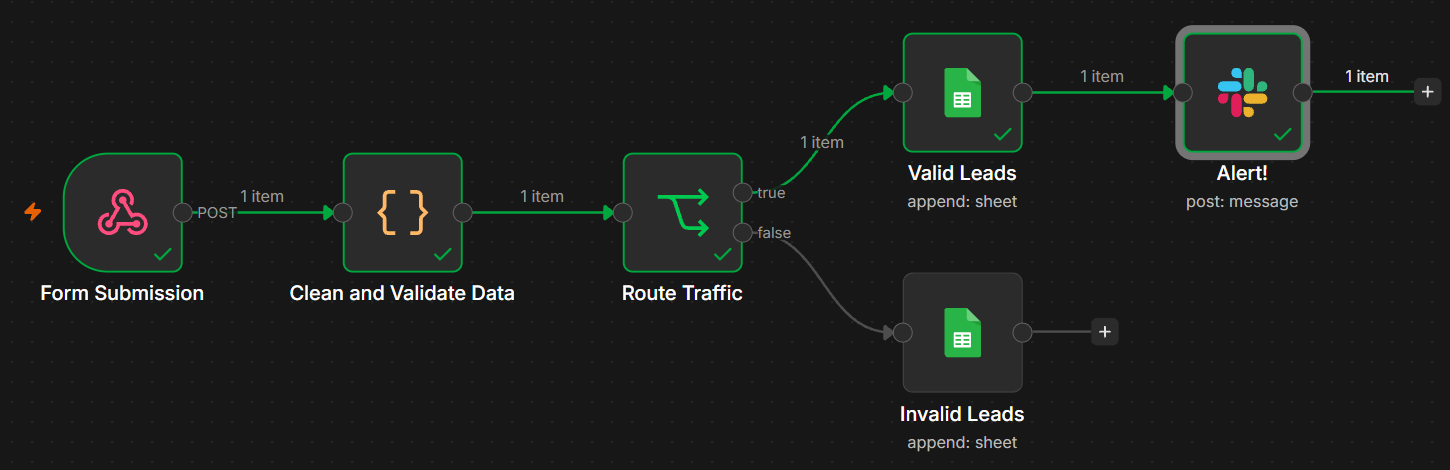
The demonstration receives website form data through a webhook, normalizes and validates it with JavaScript, and uses conditional routing to keep valid and invalid submissions on separate paths. Qualified data moves into Google Sheets / CRM records, followed by a Slack notification.
Follow the process.
The sequence below reflects the implementation described in the project handoff. It does not represent a live execution.
Receive the inquiry
A website form sends its submission to an n8n webhook.
Normalize and validate
JavaScript standardizes data and checks email and phone fields.
Choose the correct path
Conditional routing separates valid records from invalid submissions.
Update the record
The qualified lead data is written to Google Sheets / the connected CRM.
Notify the sales team
A Slack notification makes the inquiry available for the next human action.
One inquiry.
A connected process.
n8n+ JavaScript
Form data received via webhook
Normalize email and phone data
Keep valid and invalid entries separate
Create or update the lead record
Notify the sales team in Slack
Invalid submissions stay outside the qualified lead path.
EXCEPTION PATHIllustrative sequence · no live data
Illustrative architecture. See the real workflow screenshot below for the captured editor view.
A closer look at the build.
A real screenshot of the self-built demonstration. The process diagrams above explain the steps; this is the captured workflow canvas.
What the system
is designed to produce.
- A normalized lead record
- A qualified-record update in the connected destination
- A Slack sales notification
- A separate path for invalid submissions
Where this could help.
A similar system could reduce repetitive intake work and make sales handoffs more consistent. Any time savings or response improvements would need to be measured in the client’s environment.
NO MEASURED CLIENT RESULTS CLAIMEDClear about what’s shown.
Clear about what isn’t.
This case study draws on the supplied project handoff and workflow screenshots in the automation portfolio. The screenshot supports the visible workflow structure; it does not independently establish production use, client adoption, or behavior under every failure condition.
- The website diagram is an illustrative playback, not a live connection to n8n.
- Appointment booking and automated sales conversations are not part of this demonstration.
- A reviewed workflow screenshot is included; customer records and source output samples are not published.